
Search

(SCTP) Advanced Certificate in Infocomm Technology – Infrastructure and Operations

Dive into managing and optimising IT infrastructure across 7 modules and earn your Advanced Certificate.
  • Programme
  • Modules
  • Reviews (2)
  • Course Fee and Funding Details
  • FAQs
  • Intake Dates

Programme Info

The Advanced Certificate in IT Infrastructure and Operations (IIO) programme is a comprehensive IT training programme designed to equip participants with advanced skills and knowledge in managing and optimising IT infrastructure.

Through seven structured modules, participants will delve into areas such as hardware and software troubleshooting, network administration, server management, cloud computing, cybersecurity, and emerging technologies.

The programme incorporates hands-on learning experiences, practical applications, and a capstone project to ensure participants gain practical expertise and are prepared to tackle real-world IT challenges. With a focus on collaborative problem-solving and the latest industry trends, the Advanced Certificate in IIO programme prepares participants for roles in IT operations, infrastructure management, and cybersecurity.

Enrolment Requirement:

To apply for the Advanced Certificate in Infocomm Technology (Infrastructure and Operations) Programme, you should possess one of the following qualifications or meet one of these criteria:

  • Certificate in IT Infrastructure and Operations; OR
  • Mature candidates (≥ 30 years old with 8 years’ work experience in an ICT-related field); or
  • Candidates with other qualifications will be considered on a case-by-case basis

Basic computer literacy and fundamental understanding of IT Infrastructure and Operations concepts are required.

All Applicants will go through pre-enrolment screening process.

Application Documents Required:

  • Latest resume
  • Highest qualification certificate and/or academic transcript

These documents will be reviewed as part of the screening process.

Assessment Method:
Written assessment (i.e., Short Questions & Answers & Case study) & Individual Project Assignment.

 

Why Learn With Us?

  • Training led by practitioners with experience in the industryTraining led by practitioners with experience in the industry

  • Comprehensive, up-to-date curriculum and coursewareComprehensive, up-to-date curriculum and courseware

  • Real-world hands-on projectsReal-world hands-on projects
  • Career advisory and resources support Career advisory and resources support
  • LU 1: Overview of the IT Industry in Singapore and Job Roles 
    • Industry trends
    • Digital transformation
    • IT job roles
    • Required skills
  • LU 2: Basic Hardware Concepts 
    • Computer hardware components
    • Computer system types
    • Input devices
    • Output devices
  • LU 3: Basic Software Concepts 
    • Software types
    • Operating system overview
    • File management
    • Software licensing
  • LU 4: IT Overview / Glossary 
    • Essential IT terminologies
    • Common IT acronyms
    • Industry terminology

By the end of this module, participants will be able to:

  • Recognise the significance of Singapore’s IT industry and its influence across sectors.
  • Identify emerging IT trends, technologies and the effects of digital transformation.
  • Explore diverse IT roles such as help desk support, IT administrator and IT project manager.
  • Distinguish CPU functions, differences between RAM and ROM, and comparisons between storage devices.
  • Differentiate system software from application software and understand operating system roles and utility functions.
  • Define key IT terms and interpret widely used IT acronyms.
  • Written Assessment: 1 hour
  • LU 1: Introduction to Computer Hardware 
    • Definition of computer hardware
    • Significance of computer hardware
    • Key hardware components
  • LU 2: Identifying the Parts and Connectivity 
    • Motherboard
    • CPU
    • RAM
    • Storage devices
    • Graphics cards
    • Input and output devices
    • Connectivity
  • LU 3: PC Build-Up / Upgrading 
    • PC building process
    • Component compatibility
    • Step-by-step assembly
    • Troubleshooting build issues
  • LU 4: BIOS and Process Flow of Booting 
    • Introduction to BIOS
    • Boot process
    • BIOS configuration
    • Boot-related troubleshooting

By the end of this module, participants will be able to:

  • Acquire a holistic understanding of computer hardware components and their roles in user-computer interaction.
  • Identify and explain the primary functions of the motherboard, CPU, RAM, storage devices and data-transfer interfaces.
  • Assemble and upgrade a PC, assess component compatibility and troubleshoot hardware build issues.
  • Articulate the role of BIOS in the boot process and resolve boot-related errors.
  • Practical Assessment: 2 hours
  • LU 1: Introduction to Operating System 
    • Operating system roles
    • Windows operating system overview
    • Virtualised operating system overview
    • Key operating system terminology
  • LU 2: Installation and Configuration of Windows OS 
    • Evolution of Windows
    • Hardware requirements
    • Installation on physical machines
    • Installation on virtual machines
    • User account management
    • System updates
  • LU 3: Desktop Support Best Practices 
    • Role of a desktop support technician
    • Remote support tools
    • User issue management
  • LU 4: Virtualised Environment and Hands-on Activity 
    • Virtualisation concepts
    • Setting up virtual environments using VMware
    • Setting up virtual environments using VirtualBox
  • LU 5: Maintenance and Performance Optimisation 
    • System maintenance
    • Disk management
    • Performance monitoring
    • Performance troubleshooting
  • LU 6: Security and Data Backup 
    • Security threats
    • Firewall configuration
    • Data backup strategies
    • Data recovery strategies

By the end of this module, participants will be able to:
  • Understand the role of operating systems in managing computer resources across major platforms.
  • Configure Windows OS across physical and virtual environments and manage user access securely.
  • Build capabilities as a desktop support technician, including remote support and troubleshooting end-user issues.
  • Understand virtualisation principles and establish virtualised environments using VMware and VirtualBox.
  • Optimise system performance, manage disks and address performance-related issues.
  • Identify and counteract common security threats and establish resilient data backup and recovery mechanisms.
  • Practical Assessment: 2 hours
  • LU 1: Introduction to Computer Networks 
    • Network communication
    • Network components
    • Routing
    • Network devices
    • Network services
  • LU 2: Network Types, Topologies, Protocols, Methodologies 
    • Local Area Network (LAN)
    • Wide Area Network (WAN)
    • Metropolitan Area Network (MAN)
    • Network topologies
    • Network protocols
    • OSI model
    • TCP/IP model
  • LU 3: Setup and Configure Small-Scale Network, and Troubleshoot Connectivity Issues 
    • Small-scale network setup
    • Network device configuration
    • Connectivity troubleshooting
    • Collaborative network design
  • LU 4: Network Simulation Software and Design 
    • Filius network simulation software
    • Virtual network design
    • Virtual network testing

By the end of this module, participants will be able to:
  • Acquire a comprehensive understanding of computer network essentials, including components, data transmission, routing and IP addressing.
  • Understand diverse network classifications, topologies, protocols, and the OSI and TCP/IP models.
  • Design, configure and manage a small-scale network and diagnose and resolve connectivity issues.
  • Leverage network simulation software to design, test and troubleshoot virtual networks.
  • Written Assessment: 1 hour
  • Practical Assessment: 1 hour
  • LU 1: Summarizing Fundamental Security Concepts 
    • Information security principles
    • Security control types
    • Cybersecurity roles and responsibilities
  • LU 2: Comparing Threat Types 
    • Threat actor types
    • Threat actor attributes and motivations
    • Common threat vectors
    • Attack surfaces
    • Threat mitigation strategies
  • LU 3: Explaining Appropriate Cryptographic Solutions 
    • Encryption
    • Cryptographic algorithms
    • Key exchange
    • Public key infrastructure
    • Digital certificates
  • LU 4: Implement Identity and Access Management 
    • Authentication and authorisation
    • Account policies
    • Password-based authentication
    • Multifactor authentication
    • Single sign-on
    • Federated identity
  • LU 5: Maintain Enterprise Campus Network Architecture 
    • On-premises network security
    • Secure remote access
    • Secure communications
    • Network tunnelling
  • LU 6: Secure Cloud Network Architecture 
    • Cloud infrastructure security
    • Embedded system security
    • Zero Trust architecture
  • LU 7: Explain Resiliency and Site Security Concepts 
    • Asset management practices
    • Physical security controls
    • Organisational resource protection

By the end of this module, participants will be able to:

  • Explain information security concepts, security control types, and key security roles and responsibilities.
  • Analyse threat actor types, including their attributes and motivations, as well as common threat vectors and attack surfaces.
  • Apply appropriate cryptographic solutions for encryption and key exchange using cryptographic algorithms, public key infrastructure and digital certificates.
  • Apply authentication, account policy, authorisation and identity solutions, including password-based and multifactor authentication, single sign-on and federated identity.
  • Apply security principles and controls to secure on-premises network architectures and ensure secure communications for remote access and tunnelling.
  • Apply security principles to cloud infrastructure, embedded systems and Zero Trust architecture.
  • Apply asset management practices and physical security controls to protect organisational resources.
  • Practical Assessment: 2 hours
  • LU 1: Introduction to Troubleshooting Process and Identifying Common IT Issues 
    • Troubleshooting principles
    • Troubleshooting process
    • Common IT issues
    • Issue categorisation techniques
  • LU 2: Problem Analysis and Diagnosis 
    • Problem analysis
    • Root-cause identification
    • Data gathering
    • Issue prioritisation
  • LU 3: Hardware and Software Troubleshooting 
    • Hardware problem resolution
    • Software diagnostics
    • Built-in diagnostic tools
  • LU 4: Network Troubleshooting 
    • Network components
    • Connectivity diagnosis
    • Slow network performance
    • IP configuration issues
  • LU 5: Application Troubleshooting 
    • Application errors
    • Compatibility issues
    • Application performance problems
    • Software updates
  • LU 6: Security Troubleshooting 
    • Security measures
    • Security best practices
    • Responding to security incidents

By the end of this module, participants will be able to:

  • Comprehend the fundamentals of troubleshooting and recognise common IT problems in the workplace.
  • Analyse and diagnose IT problems effectively, prioritising tasks based on root causes.
  • Resolve hardware and software-related issues using appropriate diagnostic tools and techniques.
  • Demonstrate proficiency in diagnosing network connectivity problems and enhancing network performance.
  • Resolve application-related errors and software installation issues.
  • Identify, implement and respond to security-related concerns and incidents.
  • Practical Assessment: 2 hours
  • LU 1: Key Concepts of Service Management 
    • Value
    • Stakeholders
    • Service consumer roles
    • Service offerings
    • Co-creation of value
  • LU 2: Key Concepts of ITIL 4 
    • Four dimensions of service management
    • Service value system
    • Service value chain
  • LU 3: The Guiding Principles 
    • Introduction to the ITIL 4 guiding principles
    • Application of the ITIL 4 guiding principles
  • LU 4: ITIL 4 Management Practices 
    • Purpose of ITIL practices
    • Overview of eight ITIL practices
    • Key management practices — Part 1
    • Key management practices — Part 2
    • Key management practices — Part 3

By the end of this module, participants will be able to:

  • Explain the fundamentals of service management, including value, stakeholders, service offerings and value co-creation.
  • Describe the key concepts of ITIL 4, including the four dimensions, service value system and service value chain.
  • Apply the ITIL 4 guiding principles to improve service delivery and organisational effectiveness.
  • Identify the purpose and contribution of ITIL 4 management practices, including key practices in service management.
  • Practical Assessment: 2 hours
  • LU 1: Introduction to Advanced Troubleshooting 
    • Advanced hardware issues
    • Advanced software issues
    • Problem-solving methodology
    • Common complex technical challenges
  • LU 2: Advanced Hardware Troubleshooting Techniques 
    • Hardware diagnostics
    • Identifying complex hardware issues
    • Resolving complex hardware issues
    • Hands-on troubleshooting practice
  • LU 3: Advanced Software Troubleshooting Techniques 
    • Software debugging and analysis
    • Conflict-resolution techniques
    • Real-world troubleshooting scenarios
  • LU 4: Diagnosis and Resolution of Complex Technical Problems 
    • Advanced diagnostic skills
    • Complex issue prioritisation
    • Problem-solving methodologies
  • LU 5: Overview of IT Asset Management (ITAM) 
    • Introduction to IT Asset Management
    • Asset classification
    • Asset lifecycle management
    • ITAM tools
    • Real-world case studies

By the end of this module, participants will be able to:

  • Evaluate the significance of advanced troubleshooting techniques and methodologies for resolving complex hardware and software challenges.
  • Explain the functions of key computer hardware components, including the motherboard, CPU, RAM, storage and I/O devices.
  • Utilise software debugging and conflict-resolution techniques in real-world scenarios.
  • Apply advanced diagnostic and prioritisation skills to efficiently resolve complex technical challenges.
  • Explain the importance of IT Asset Management, including asset types, regulations, disposal practices and environmental sustainability.
  • Apply ITAM principles in a hands-on workshop setting to manage, track and dispose of IT assets effectively.
  • Written Assessment: 1 hour
  • Practical Assessment: 1 hour
  • LU 1: Introduction to Microsoft Server Environment 
    • Server concepts
    • Server hardware
    • Server roles
    • Windows Server features
    • Active Directory overview
    • DNS overview
    • DMZ overview
    • Cloud overview
  • LU 2: Server Installation 
    • Server installation options
    • Virtual servers
    • Physical servers
    • Windows Server 2022 installation
  • LU 3: Deployment of Active Directory Domain Service (ADDS) 
    • Active Directory structure
    • Domain controllers
    • Organisational Units (OUs)
    • User management
    • Group management
    • Read-Only Domain Controllers (RODC)
  • LU 4: Deployment of DNS and DHCP 
    • DNS setup
    • DNS zone configuration
    • DNS forwarders
    • DHCP configuration
    • DHCP scopes
  • LU 5: Deployment of Disks, File System and Storage Space 
    • Disk types
    • Volumes
    • NTFS permissions
    • Share permissions
    • Storage replicas
  • LU 6: Deployment of Remote Access Services 
    • Remote access roles
    • VPN configuration
  • LU 7: Hyper-V in Windows Server 
    • Purpose of Hyper-V
    • Virtual machine memory management
    • Integration services
    • Checkpoints
  • LU 8: High Availability and Disaster Recovery 
    • Business continuity planning
    • High Availability strategies
    • Data backup
    • Disaster recovery

By the end of this module, participants will be able to:

  • Explain server and client-server concepts, including hardware, roles and network infrastructure components.
  • Install and configure Windows Server on physical and virtual machines.
  • Set up and manage Active Directory, including domain controllers, OUs, users, groups and RODC.
  • Configure DNS and DHCP services, including zones, records, scopes and failover mechanisms.
  • Manage storage, including disk types, volumes, NTFS permissions and storage replicas.
  • Install and configure Remote Access Services with VPN support.
  • Administer Hyper-V virtual machines, including memory management and checkpoints.
  • Plan and implement High Availability and Disaster Recovery strategies.
  • Written Assessment: 1 hour
  • Practical Assessment: 1 hour
  • LU 1: Introduction to Cloud Computing 
    • Cloud concepts
    • Microsoft Azure benefits
    • Core Azure architecture
    • Identity and access
    • Cloud security
    • Azure management tools
  • LU 2: Introduction to Cloud Virtual Network 
    • Configuring virtual networks
    • Network Security Groups (NSGs)
    • Azure DNS
    • Virtual Network peering
    • Azure Load Balancer
  • LU 3: Introduction to Cloud Storage 
    • Storage accounts
    • Blob storage
    • File storage
    • Storage security
  • LU 4: Introduction to Cloud Virtual Machines 
    • Virtual machine planning
    • Virtual machine creation
    • Virtual machine availability
    • Azure App Service Plan
  • LU 5: Introduction to Cloud Monitoring 
    • Azure Monitor
    • Network Watcher
    • Azure Alerts configuration

By the end of this module, participants will be able to:

  • Explain the core concepts, architecture and characteristics of cloud computing.
  • Differentiate between IaaS, PaaS and SaaS and apply the appropriate service model to use cases.
  • Evaluate cloud deployment models—public, private, hybrid and community—with an emphasis on security and governance.
  • Configure virtual networks, subnets and IP addressing to establish secure connectivity.
  • Manage cloud storage solutions, including object, block and file storage.
  • Deploy and configure virtual machines covering sizing, storage and networking requirements.
  • Configure Azure Monitor for performance tracking, alerts and proactive troubleshooting.
  • Demonstrate readiness for the AZ-900 and AZ-104 certification examinations.
  • Written Assessment: 1 hour
  • Practical Assessment: 1 hour
  • LU 1: Azure Networking Fundamentals 
    • Azure Virtual Networks and architectures
    • Subnets and IP addressing
    • Hub-and-spoke design
    • Azure DNS
    • Network Security Groups
    • Lab activities
  • LU 2: Hybrid Connectivity and Security 
    • Site-to-Site VPN
    • Point-to-Site VPN
    • Azure ExpressRoute
    • Azure Virtual WAN
    • Azure Private Link
    • Azure Firewall
    • Expanded Network Security Group configuration
  • LU 3: Load Balancing and Application Delivery 
    • Azure Load Balancer
    • Application Gateway
    • Traffic Manager
    • Azure Front Door
    • Web Application Firewall
    • High Availability
  • LU 4: Monitoring, Troubleshooting and Monitoring Workflow 
    • Azure Monitor
    • Network Watcher
    • Network monitoring workflows
    • Troubleshooting labs
  • LU 5: Advanced Routing and Multi-Region Design 
    • User-Defined Routes
    • Border Gateway Protocol
    • Advanced routing techniques
    • Multi-region design patterns

By the end of this module, participants will be able to:

  • Design and configure Azure Virtual Networks, subnets, DNS zones and security groups for scalable cloud environments.
  • Implement hybrid connectivity using VPNs, ExpressRoute and Virtual WAN.
  • Deploy and manage load-balancing solutions to optimise application delivery and availability.
  • Secure applications and networks with Network Security Groups, Azure Firewall, Private Link and Web Application Firewall.
  • Monitor and troubleshoot Azure networking using Azure Monitor, Network Watcher and advanced routing techniques.
  • Apply advanced design patterns for multi-region, resilient and compliant architectures.
  • Demonstrate readiness for the AZ-700 certification examination.
  • Written Assessment: 1 hour
  • Practical Assessment: 1 hour
  • LU 1: Explain Vulnerability Management 
    • Common Vulnerabilities and Exposures framework
    • Vulnerability assessment tools
    • Vulnerability scan results
    • False positives and false negatives
    • Log reviews and indicators of compromise
    • Remediation strategies
  • LU 2: Evaluate Network Security Capabilities 
    • Access control lists
    • Intrusion detection and prevention systems
    • IDS/IPS detection methods
    • Web filtering
    • Network infrastructure protection
  • LU 3: Assess Endpoint Security Capabilities 
    • Mobile device hardening
    • Full-device encryption
    • External media controls
    • Location service restrictions
    • Secure mobile connectivity
  • LU 4: Enhance Application Security Capabilities 
    • Application protocol security baselines
    • Transport Layer Security
    • Secure directory services
    • Secure file-transfer and email services
    • Email data loss prevention
    • DNS filtering
    • Secure coding techniques
    • Software sandboxing
  • LU 5: Explain Alerting and Monitoring Concepts 
    • Security alerting
    • Security monitoring
    • Incident response procedures
    • Digital forensics procedures
    • Security investigation data sources
  • LU 6: Analyse Indicators of Malicious Activity 
    • Malware attacks
    • Physical attacks
    • Network attacks
    • Application attacks
    • Indicators of malicious activity
  • LU 7: Summarise Security Governance Concepts 
    • Security policies and procedures
    • Security standards
    • Legal environment
    • Governance and accountability
    • Automation and orchestration workflows
  • LU 8: Explain Risk Management Processes 
    • Organisational risk identification
    • Risk-management strategies
    • Business impact analysis
    • Vendor assessment
    • Security assessments
    • Penetration testing
  • LU 9: Summarise Data Protection and Compliance Concepts 
    • Data types and classification
    • Data sovereignty
    • Privacy and compliance requirements
    • Data loss prevention
    • Breach response
    • Security awareness training

By the end of this module, participants will be able to:

  • Apply the CVE framework and vulnerability-assessment tools to examine scan results, differentiate between false positives and false negatives, and conduct structured log reviews to detect anomalies and indicators of compromise.
  • Apply a structured vulnerability-response process by selecting appropriate remediation strategies, including patching, configuration changes and compensating controls.
  • Apply network security controls by configuring and using access control lists, intrusion detection and prevention systems, IDS/IPS detection methods and web filtering.
  • Implement mobile device hardening techniques by configuring device security settings, full-device encryption, external media controls and location service restrictions.
  • Secure mobile device connectivity methods by applying appropriate controls for cellular, GPS, Wi-Fi, tethering, Bluetooth, Near-Field Communication and mobile payment services.
  • Apply application protocol security baselines by configuring secure protocols, Transport Layer Security, secure directory services, SNMP security, file-transfer services, email services, email security, email data loss prevention and DNS filtering.
  • Apply application security controls using secure coding techniques, application protection mechanisms and software sandboxing.
  • Apply incident response and digital forensics procedures using appropriate data sources to support incident investigations and evidence-based security analysis.
  • Analyse indicators of malicious activity in malware, physical, network and application attacks.
  • Apply organisational governance and compliance requirements related to policies, procedures, standards, the legal environment, governance and accountability.
  • Implement automation and orchestration workflows by applying basic scripting techniques to execute routine security operations accurately and consistently.
  • Apply risk-management processes to identify organisational risks, use appropriate risk-management strategies and complete a basic business impact analysis.
  • Apply vendor-assessment methods to support vendor selection and review relevant legal agreements.
  • Apply security-assessment methods using attestation, assessment activities, penetration testing and appropriate exercise types.
  • Apply data-governance principles by identifying and classifying data and considering sovereignty, geographical, privacy and compliance requirements.
  • Apply data-protection controls using monitoring, reporting, data loss prevention and breach-response measures.
  • Apply security-awareness and conduct-policy requirements using role-based training, appropriate topics and techniques, and the security-awareness training lifecycle.
  • Written Assessment: 1 hour
  • Practical Assessment: 1 hour
  • LU 1: What are Emerging Technologies 
    • Definition of emerging technologies
    • Identification of emerging technologies
    • Impact on enterprises
    • Risks of non-adoption
  • LU 2: How to Approach Emerging Technologies 
    • Identifying technology trends
    • Assessing enterprise readiness
  • LU 3: Exploration of Emerging Technologies in IT 
    • Artificial Intelligence
    • AI Trust, Risk and Security Management
    • Robotic Process Automation
    • Intelligent Process Automation
    • Internet of Things
    • Artificial Intelligence of Things
    • Augmented, Virtual and Mixed Reality
    • Green computing
    • Digital twins
  • LU 4: Exploration of Digital Workplace Technologies 
    • Evolution of the digital workplace
    • Post-pandemic workplace changes
    • Visitor management systems
    • Collaboration suites
    • Smart building technologies
    • Access control systems
  • LU 5: Scenario-Based Case Study 
    • Applied enterprise transformation proposal
    • Application of emerging technologies
    • Application of digital workplace technologies

By the end of this module, participants will be able to:

  • Describe the elements and impact of emerging technologies on enterprises.
  • Review market trends and determine when and how to implement emerging technologies.
  • Explore and comprehend key emerging technologies, including AI, RPA/IPA, IoT/AIoT, VR/AR, green computing and digital twins.
  • Discuss the concept of the digital workplace and describe its evolution in a post-pandemic context.
  • Recognise and differentiate technologies that shape the AI-powered digital workplace.
  • Formulate a proposal to transform and optimise an enterprise through emerging and digital workplace technologies.
  • Practical Assessment: 2 hours
  • LU 1: Scope Capstone Project 
    • Purpose of the IT Asset Inventory Plan
    • Purpose of the Cloud Computing project
    • Overview of the capstone plan template
  • LU 2: Documentation of Project 
    • Project engagement document
    • Project deliverables
    • Work schedule
    • Resource planning
    • Stakeholder sign-off
  • LU 3: Performing Work and Managing Stakeholder Communication 
    • Project work paper
    • Communication plan execution
  • LU 4: Delivering the Outcomes to the Stakeholders 
    • Final report delivery
    • Project closure
  • LU 5: Reviewing Work Performed for Capstone 
    • Individual project phase review
    • Post-implementation review

By the end of this module, participants will be able to:

  • Design a plan for an IT Asset Inventory or Cloud Computing Solution.
  • Develop a comprehensive capstone project plan, including scope, documentation and stakeholder sign-off.
  • Execute the capstone project by performing the defined scope, managing stakeholder communications and documenting activities.
  • Finalise and deliver the capstone project by producing and presenting the final report and securing sign-off.
  • Conduct a comprehensive review of individual project phases and post-implementation outcomes.
  • Practical Assessment: 60 minutes
  • Oral Assessment: 60 minutes
  • Student Review

    I had a great experience at ASK Training in Tanjong Pagar. The environment is very conducive for learning and the staff are exceptionally nice and helpful. The trainers are knowledgeable and share their real-world experiences, making the training sessions very insightful. Highly recommended!

  • Student Review

    The training environment is good, with friendly and helpful staff. The trainers are very engaging and knowledgeable practitioners in their own fields of study.

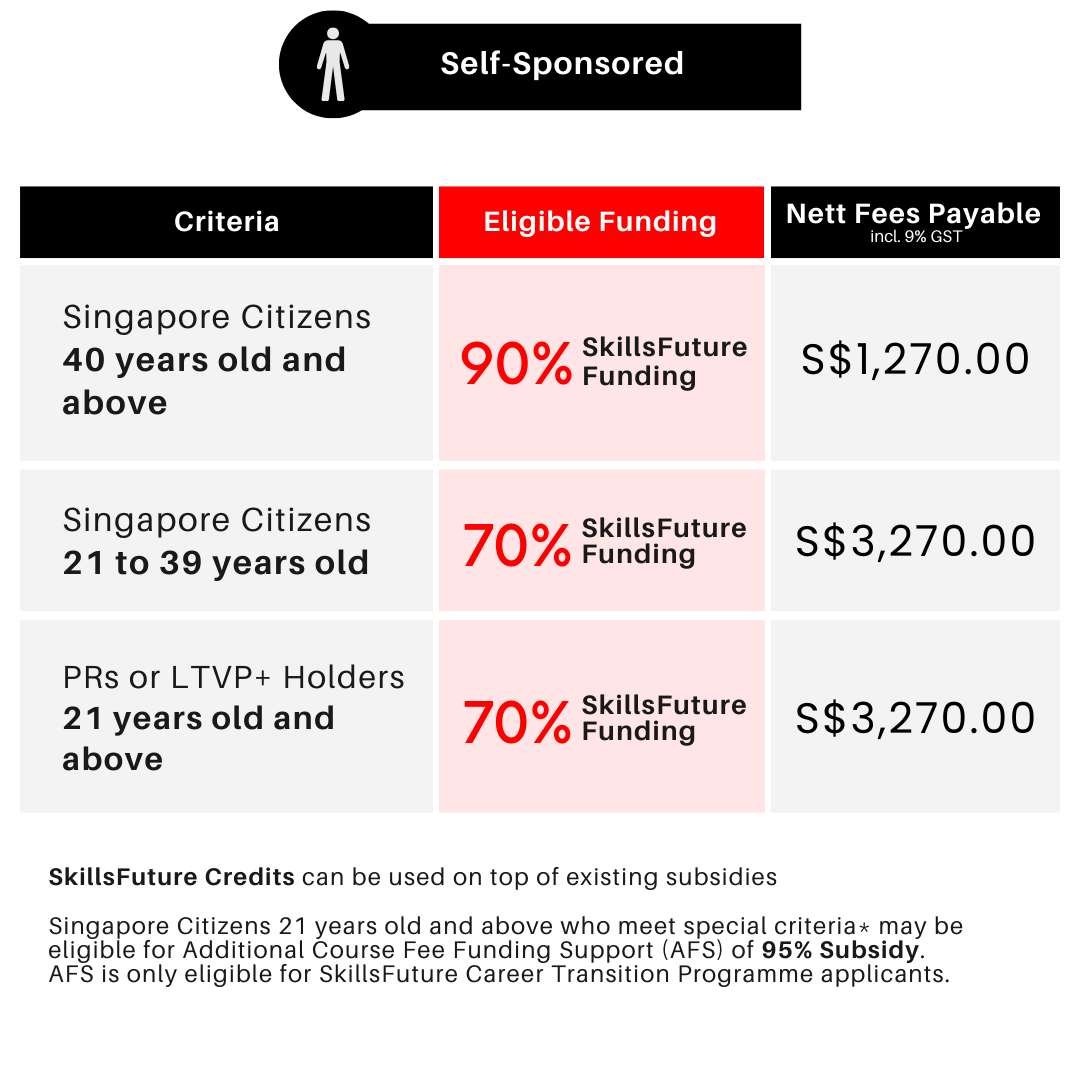
Self Sponsored Students

  • Course
  • SCTP

What is an Advanced Certificate and how is it different from the Certificate in Infocomm Technology (Infrastructure and Operations)?

In Singapore, an Advanced Certificate is typically a higher qualification than a regular Certificate. If you’re considering the Advanced Certificate in Infocomm Technology (Infrastructure & Operations), you likely already have a basic understanding of IT. The Advanced Certificate involves more in-depth study and a higher level of difficulty.

What is the course duration for the Advanced Certificate in Infocomm Technology (Infrastructure and Operations)?

The course duration is 29.5 days (236 hours). The average duration to complete this course is 6 months.

What is covered in the Advanced Certificate in Infocomm Technology (Infrastructure & Operations) course?

This course builds on your existing IT knowledge and equips you with advanced troubleshooting skills for hardware, software, and networks. You’ll also learn to manage Microsoft Server environments, including Active Directory, storage solutions, and virtualisation with Hyper-V.

Who is the Advanced Certificate in Infocomm Technology (Infrastructure and Operations) for?

This Advanced Certificate is ideal for IT professionals in Singapore looking to advance their careers in infrastructure and operations. It’s also suitable for individuals with an existing foundation in IT who want to specialise in server administration and network troubleshooting.

Is there a hands-on component in the Advanced Certificate in Infocomm Technology (Infrastructure and Operations) course?

Yes, the course includes hands-on activities and a Capstone Project at the end of this course. This is to solidify your understanding of the concepts and allow you to practice your newly acquired skills in real-world scenarios.

What are the course schedules?

We have multiple intakes available. Please check our course schedule by clicking on the “Intake Dates” tab above for the latest schedules or if you require more assistance, drop us a message and our course consultants will be happy to help.

Are there any subsidies available?

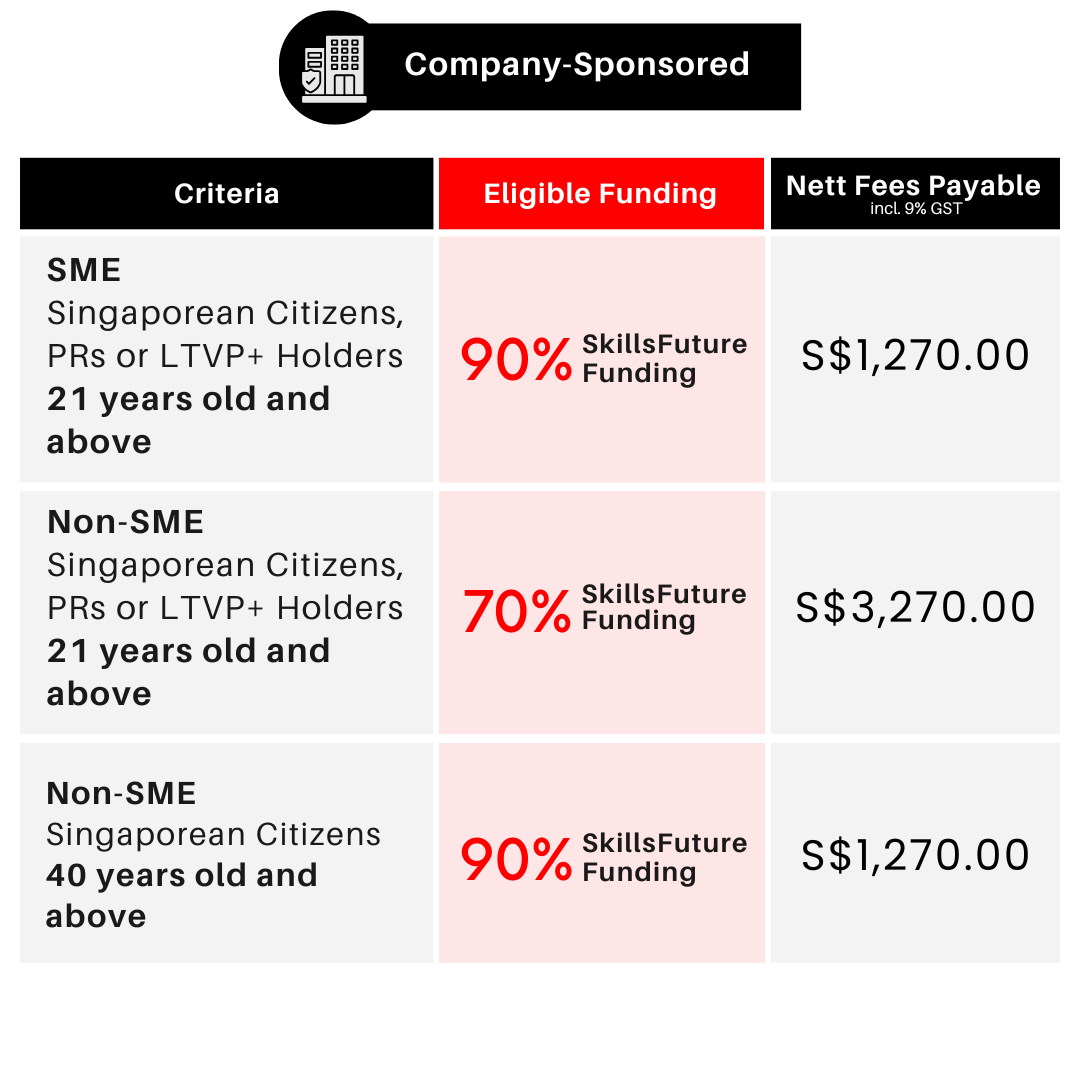
Yes, you may be eligible for subsidies to help you offset the cost of the Advanced Certificate in Infocomm Technology (Infrastructure & Operations) course with up to 95% SkillsFuture funding.

For more details on the courses and available funding, check out the course fees and subsidies section above, see our Funding Information page or get in touch with our team for further clarification.

What is the SkillsFuture Career Transition Programme (SCTP)?

The SkillsFuture Career Transition Programme (SCTP) supports mid-career individuals in acquiring industry-relevant skills to improve employability and pivot to new sectors or job roles.

You can choose to study part-time or full-time, depending on what suits you best, and the programme lasts between 3 to 12 months.

This ensures individuals like you have the opportunity to upskill or re-skill while effectively preparing for successful career transitions.

For more information on SkillsFuture Career Transition Programmes (SCTP), visit the MySkillsFuture website.

Is the SkillsFuture Career Transition Programme (SCTP) recognised in Singapore, and how can it help me advance in my career?

Yes, the SkillsFuture Career Transition Programme (SCTP) is a government initiative in Singapore designed to assist mid-career individuals in acquiring new skills and knowledge to facilitate a career transition.

This programme is geared towards individuals who wish to switch industries or occupations due to changes in the job market, technological advancements, or personal career goals.

  • November 2025
Advanced Certificate in Infocomm Technology (Infrastrutcure & Operations)
Fee Excluding GST $10,000.00
For Singaporeans > 21 (Excl. GST) $3,000.00
For Singaporeans > 40 (Excl. GST) $1,000.00
For Foreigners (Excl. GST) $10,000.00

Why Join Us?

Recognised Certification

Graduate with a recognised certificate

joinus08

Real Hands-on Projects

Experience real-world application through hands-on projects with real project partners

Relevant and comprehensive courseware

Learning materials are vetted by our Dean to ensure relevant and up-to-date curriculum

Personalised Mentorship

Gain one-on-one coaching by our mentors when completing your capstone project

Career Advisory & Resources Support

Personalised career advise and support to assist in your job search

Expert-led Training

Trainers are hand-picked industry experts who are certified trainers, offering real-world insights


Meet Your Trainers

Learn Digital Marketing live from industry experts for real-world insights
techar
Jeff Bezos
CEO, Amazon

Bachelor's of Computing in Information System National University of Singapore

techar
Jeff Bezos
CEO, Amazon

Bachelor's of Computing in Information System National University of Singapore

techar
Jeff Bezos
CEO, Amazon

Bachelor's of Computing in Information System National University of Singapore
techar
Jeff Bezos
CEO, Amazon

Bachelor's of Computing in Information System National University of Singapore

Hear from our Programme Alumni

Listen to What Some of Our Graduates Have To Say

Are you ready to kickstart your career?

If you’re thinking about taking your next step but are still unsure of which programme suits your needs best, our programme consultants are available to guide you through your learning journey.

Speak to us now to find out more!


    women on the phone

    Grant Calculator

    Download Programme Brochure

    brochure-img